An ultrawide monitor is the screen most likely to need an arm. Its stand is deep, it wants more viewing distance than a 27 inch screen, and on a typical home desk the only way to get that distance is to lift the screen off the surface and push it back toward the wall. It is also the screen most likely to defeat an arm: a 34 inch ultrawide can sit near the top of a mid-range arm's rating, and a 49 inch model is heavier still, with a curve that moves its weight forward of the mount.
We compared arms sold on Amazon that their makers rate for 34 inch screens and larger, using the manufacturers' published VESA patterns, monitor weight ranges and maximum screen sizes from the listings and VIVO's own product page. We did not test these arms. Before you buy, look up your monitor's weight without its stand on its spec sheet; that single number rules most arms in or out.
How we research. We compare published specifications, manufacturer documentation and the details on each listing. We have not tested these products ourselves. Prices come from Amazon and were checked on the date above; they change often. As an Amazon Associate we earn from qualifying purchases, at no extra cost to you. Our method · Disclosure
Quick answer
The short answer
Buy by weight range, not by screen size
If your ultrawide weighs 20 lb or more without its stand, the Ergotron HX is the arm to buy: rated for 20–42 lb and screens up to 49 inches, with a 10-year warranty. For a deeply curved 49 inch screen such as the Odyssey G9, get the HX HD with its heavier pivot.
If your 34 inch ultrawide is lighter than 20 lb, the HX may be too strong to hold it in place. The Ergotron LX Pro (4–22 lb) is the better fit, and the HUANUO TitanLift (6.6–44 lb) covers both light and heavy screens for much less money.
What fit means for an ultrawide arm
A gas-spring or mechanical-spring arm works by balancing the screen's weight. If the screen is heavier than the arm's maximum, it sinks. If it is lighter than the arm's minimum, it creeps upward and will not stay where you set it, even with the tension turned all the way down. That is why we list both ends of each arm's range, and why a heavy-duty arm is not automatically the safe choice for a 34 inch screen.
Curved screens add a second problem: the curve pushes the screen's center of gravity forward of the mounting plate, which adds leverage on the tilt joint. Ergotron sells separate pivots for this reason, and its HX VHD lists a 9–14 inch screen depth range alongside its weight range.
- VESA pattern. Almost every ultrawide uses 75 x 75 or 100 x 100 mm. Only the Ergotron HX here also accepts 200 x 100 and 200 x 200 without an adapter.
- Weight range. Use the monitor's weight without its stand. Stay comfortably inside the arm's range rather than at either end.
- Maximum screen size. This is the maker's limit for width and leverage. A 49 inch super-ultrawide needs an arm rated for 49 inches, not just for its weight.
- Desk edge. Check the clamp's thickness range, and that nothing (a crossbar, a drawer, a modesty panel) sits directly under the back edge. Heavier arms need solid wood or a solid core, not glass.
Our picks
Ranked on build, warranty and how cleanly each arm's published range matches common ultrawide weights, then on value.

Ergotron HX Heavy Duty Monitor Arm (Standard Pivot)
$329 · sold by Ergotron, Inc
The HX is Ergotron's heavy-duty arm for flat or gently curved ultrawides, rated for 20–42 lb and screens up to 49 inches, with VESA 75, 100, 200 x 100 and 200 x 200 support. The listing gives 11.5 inches of lift, a clamp for desks 0.4–2.6 inches thick or a grommet mount, and a 10-year warranty. It is sold by Ergotron on Amazon.
- 11.5 in of lift; screen rises 17.8 in above the desk
- Clamp for desks 0.4–2.6 in thick, or grommet mount
- Samsung 49 in Odyssey G9 needs the separate HD Tilt Pivot
- 10-year warranty per Ergotron
- Your ultrawide weighs 20 lb or more without its stand
- You want the longest warranty here and a maker that sells spare parts and accessories
- Your screen weighs under 20 lb; it may drift upward
- You own a 1000R curved 49 inch screen; Ergotron says the G9 needs the separate HD pivot
Only 16 left in stock - order soon.
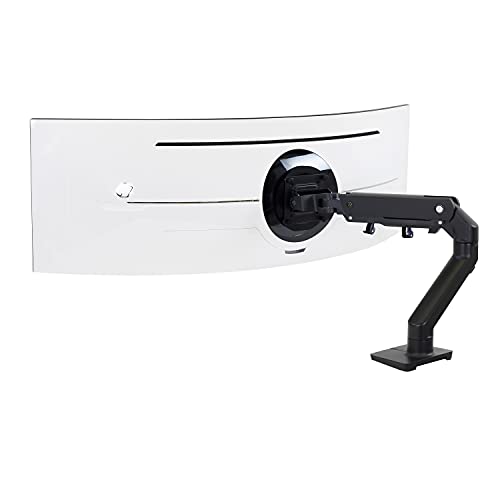
Ergotron HX HD Heavy Duty Monitor Arm (HD Pivot)
$369 · sold by Ergotron, Inc
The HX HD is the same arm with Ergotron's heavier HD pivot, made for tightly curved super-ultrawides like the Samsung Odyssey G9. It is rated for 28–42 lb and up to 49 inches, with VESA 75 and 100, and keeps the 11.5 inches of lift and 10-year warranty.
- Made for 1000R curved ultrawides like the Odyssey G9
- 11.5 in of lift, 20 degrees of tilt
- Clamp for desks 0.4–2.6 in thick, or grommet mount
- 10-year warranty per Ergotron
- Your screen is a 1000R curved 49 inch model
- You want the pivot included rather than bought separately
- Your screen weighs under 28 lb
- You need more than 20 degrees of tilt
Only 11 left in stock - order soon.

HUANUO TitanLift Heavy Duty Monitor Arm
$109.99 · sold by Bestergo Direct
HUANUO rates the TitanLift for 17–49 inch screens and an unusually wide 6.6–44 lb, which covers both a lighter 34 inch ultrawide and a heavy 49 inch screen. The listing gives up to 22.5 inches of extension and a dual clamp for wooden desks 0.8–3.5 inches thick, at $109.99 on November 14, 2026.
- Screens 17–49 in, aluminum arm
- Up to 22.5 in of extension, 19.6 in height to VESA center
- Clamp for wooden desks 0.8–3.5 in thick, no crossbeam below
- You do not know your monitor's exact weight yet and want a broad range
- Your desk top is thick, up to 3.5 inches
- Your desk is glass, plastic or has a crossbar under the back edge; the listing rules those out
- A long warranty matters; HUANUO's terms are not on the listing
In stock on Amazon
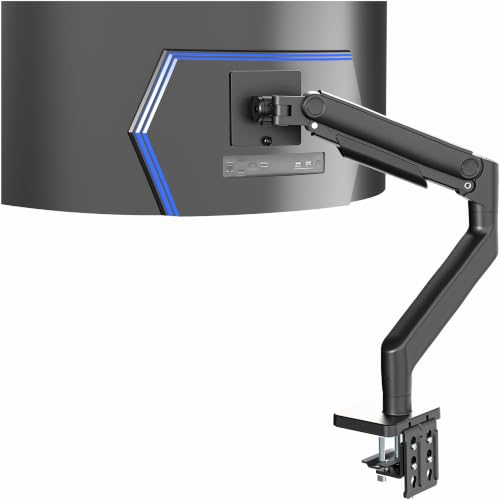
VIVO Aluminum Ultrawide Monitor Tension Arm (STAND-V101V)
$79.99 · sold by V I V O
VIVO's STAND-V101V is rated for 17–49 inch screens and 4.4–44 lb on VIVO's product page, with VESA 75 and 100, 11 inches of spring-assisted height adjustment and a clamp for desks up to 3.2 inches thick. It is the least expensive arm here that covers a 49 inch screen.
- Screens 17–49 in per VIVO
- 11 in of height adjustment, +50° to -20° tilt
- Clamp for desks up to 3.2 in thick; grommet up to 1.4 in
- You want a wide weight range on a tight budget
- Your desk is thicker than the Ergotron clamps allow
- A published warranty term matters; it is not on the listing
- Your screen is at the top of the 44 lb rating; leave headroom
In stock on Amazon

Ergotron LX Pro Monitor Arm
$194.99 · sold by SNK Official Store
The upgraded LX Pro is Ergotron's standard arm, rated for screens up to 34 inches, 4–22 lb and up to 3.6 inches deep. Some 34 inch ultrawides weigh less than the 20 lb minimum of the HX, and this is the arm that suits them, with 13 inches of lift and Ergotron's 10-year warranty.
- Screens up to 3.6 in deep
- 13 in of lift; screen rises up to 18.3 in above the desk
- Clamp for desks 0.4–2.4 in thick; grommet mount sold separately
- 10-year warranty per Ergotron
- Your 34 inch ultrawide weighs under 22 lb without its stand
- You want more lift than the HX offers
- Your screen is larger than 34 inches or deeper than 3.6 inches
- You need a grommet mount; it is sold separately
Ships after a lead time

Ergotron HX VHD Heavy Duty Monitor Arm
$409 · sold by Ergotron, Inc
For the largest curved screens, the HX VHD is rated up to 57 inches, 28.7–37.5 lb and 9–14 inches of screen depth, with VESA 75 and 100, 11.5 inches of lift and 17.6 inches of extension. It is a narrow, specific range, so check your screen against all three numbers.
- For curved screens 9–14 in deep, up to 57 in
- 11.5 in of lift, 17.6 in of extension
- Clamp for desks up to 2.6 in thick, or grommet mount
- 10-year warranty per Ergotron
- You own a 57 inch dual-4K super-ultrawide within its weight and depth range
- Your screen is lighter than 28.7 lb or heavier than 37.5 lb
Only 18 left in stock - order soon.

Amazon Basics Adjustable Single Monitor Arm
$28.99 · sold by Amazon.com
Amazon Basics rates this arm for flat screens up to 32 inches or ultrawides up to 38 inches, and up to 22 lb, with VESA 75 and 100 and a clamp for desks up to 4.25 inches thick. No minimum weight is published, so it is a fit only for lighter 34 inch screens.
- Holds up to 32 in flat or 38 in ultrawide, up to 22 lb per listing
- No minimum weight published
- Clamp or grommet for desks 0.39–4.25 in thick
- Your ultrawide is light and you want the lowest cost
- Your screen is close to 22 lb; there is little headroom
- You want a published minimum weight to check against
In stock on Amazon
The picks side by side
| Specification | | | | | | | |
|---|---|---|---|---|---|---|---|
| VESA | 75 × 75, 100 × 100, 200 × 100, 200 × 200 | 75 × 75, 100 × 100 | 75 × 75, 100 × 100 | 75 × 75, 100 × 100 | 75 × 75, 100 × 100 | 75 × 75, 100 × 100 | 75 × 75, 100 × 100 |
| Monitor weight | 20–42 lb (9.1–19.1 kg) | 28–42 lb (12.7–19.1 kg) | 6.6–44 lb (3–20 kg) | 4.4–44 lb (2–20 kg) | 4–22 lb (1.8–10 kg) | 28.7–37.5 lb (13–17 kg) | Not published |
| Max screen | 49 in | 49 in | 49 in | 49 in | 34 in | 57 in | 38 in |
| Height adjustment | 11.5 in lift | 11.5 in lift | 19.6 in max to VESA center | 11 in | 13 in lift | 11.5 in lift | Not published |
| Desk clamp range | 0.4–2.6 in | 0.4–2.6 in | 0.8–3.5 in (wood) | Up to 3.2 in | 0.4–2.4 in | Up to 2.6 in | 0.39–4.25 in |
| Warranty | 10 years | 10 years | Not on listing | Not on listing | 10 years | 10 years | Not on listing |
| Best for | 20–42 lb ultrawides | 1000R 49 in screens | Wide weight range | Lowest cost to 49 in | 34 in under 22 lb | 57 in screens | Light 34 in screens |
| Price | $329 | $369 | $109.99 | $79.99 | $194.99 | $409 | $28.99 |
| Buy | View on Amazon | View on Amazon | View on Amazon | View on Amazon | View on Amazon | View on Amazon | View on Amazon |
Weight ranges are for the monitor without its stand. The Amazon Basics arm publishes only a maximum.
How to choose
Weigh the panel, not the box
Use the 'without stand' weight on your monitor's spec sheet. If it is missing, the shipping weight is far too high to use.
Stay inside the range
Aim for the middle of an arm's rating. Near the top it sags over time; near the bottom it will not hold a low position.
Check the desk under the clamp
Measure the top's thickness and look under the back edge for frames, drawers and cable trays. Standing desks often have a crossbar there.
Mind the standing desk's capacity
An arm plus a large ultrawide adds real weight to a standing desk frame. Add it to everything else on the desk before comparing with the desk's lifting capacity.
Use the depth you gain
A 34 inch ultrawide is comfortable from about 27 to 43 inches away. Our desk depth guide shows how far back the arm should hold it.
Who should skip these
If your monitor is a 27 or 32 inch 16:9 screen, you do not need a heavy-duty arm; a standard arm such as the LX Pro is a better match, and a heavy-duty arm may not hold a lighter screen in place. If you are still choosing that screen, see our 27 vs 32 inch comparison.
If your desk is glass or has a thin or hollow top, a clamp arm is risky with an ultrawide. A freestanding heavy-base stand or a wall mount is a safer route.
Humanscale's M8.1 is a well-regarded heavy-duty arm, but on Amazon it was only offered by third-party resellers, some with a lead time, at prices we could not recommend. If you want one, buy it from Humanscale or an authorized dealer directly; we earn nothing on those sales.
Common questions
What is the best monitor arm for an ultrawide monitor?
For ultrawides that weigh 20–42 lb without their stand, the Ergotron HX, rated up to 49 inches with a 10-year warranty; it was $329 on November 14, 2026. For lighter 34 inch screens, the Ergotron LX Pro (4–22 lb). For a wide range at a lower price, the HUANUO TitanLift (6.6–44 lb).
Can a regular monitor arm hold a 34 inch ultrawide?
Often yes, if the monitor's weight without its stand is inside the arm's rated range and the maker lists 34 inches as supported. The Ergotron LX Pro, for example, is rated for screens up to 34 inches and 4–22 lb.
Why does my monitor arm keep rising?
The screen is lighter than the arm's minimum rated weight, or the tension is set too high. Heavy-duty arms like the Ergotron HX start at 20 lb, so a lighter 34 inch ultrawide may never stay down on one.
Do I need a special arm for a Samsung Odyssey G9?
You need one rated for 49 inch, 1000R curved screens and the G9's weight. Ergotron says the standard HX needs its separate HD tilt pivot for the G9, and sells the HX HD with that pivot included.
What VESA size do ultrawide monitors use?
Most use 100 x 100 mm, and some use 75 x 75 mm. Every arm in this list supports both. A few large screens use larger patterns; the Ergotron HX also accepts 200 x 100 and 200 x 200.
Sources
- VIVO STAND-V101V product page
- Ergotron HX Heavy Duty Monitor Arm (Standard Pivot): Amazon listing
- Ergotron HX HD Heavy Duty Monitor Arm (HD Pivot): Amazon listing
- HUANUO TitanLift Heavy Duty Monitor Arm: Amazon listing
- Ergotron LX Pro Monitor Arm: Amazon listing
- Ergotron HX VHD Heavy Duty Monitor Arm: Amazon listing
- Amazon Basics Adjustable Single Monitor Arm: Amazon listing
Specifications are taken from each manufacturer or listing, not from our own testing. Where a number is marked “Not published”, we could not confirm it from the manufacturer. Recommended viewing distances are calculated, as explained in how we research.