If you work on a Mac all day, the screen is the part of the setup you look at for eight hours, and the one that most often disappoints. A typical 27 inch 4K monitor sits at about 163 pixels per inch, which forces macOS to choose between oversized text or a scaled mode that looks slightly soft. Apple's Studio Display solves this with a 27 inch 5K panel at 218 ppi, but it sells at $1,549 on November 14, 2026 in its base configuration with a tilt-only stand, and the height-adjustable stand costs extra.
We compared the monitors on Amazon that reach the same pixel density (5K at 27 inches, 6K at 32 inches) plus one well-regarded 4K option, using the manufacturers' published specifications and the Amazon listings. We looked at pixel density, single-cable charging wattage for a MacBook, ports, the stand, and VESA mounting. We did not test these monitors ourselves; where a spec is not published, the cards say so. Prices are Amazon's current prices and change often.
How we research. We compare published specifications, manufacturer documentation and the details on each listing. We have not tested these products ourselves. Prices come from Amazon and were checked on the date above; they change often. As an Amazon Associate we earn from qualifying purchases, at no extra cost to you. Our method · Disclosure
Quick answer
The short answer
Match the pixel density first, then pay for the extras you will use
For most Mac owners the BenQ PD2730S is the closest substitute: the same 27 inch 5K panel resolution, a height-adjustable stand in the box, a matte anti-reflection finish and Thunderbolt 4 with 90W charging. If your desk is deep enough for a bigger screen, the ASUS ProArt PA32QCV gives you 6K at 32 inches with the same 218 ppi sharpness.
Buy the Studio Display itself if the built-in camera, microphones and speakers would replace devices you would otherwise buy, or if Thunderbolt 5 matters to you. Otherwise you are paying mostly for the enclosure.
What fit means for a Mac monitor
macOS draws its interface at exactly twice the pixel count of a nominal layout. On a 27 inch 5K panel (5120 x 2880) that produces a crisp workspace that looks like 2560 x 1440, the size most people find comfortable at 27 inches. On a 27 inch 4K panel the same 2x rendering looks like 1920 x 1080, which feels large, so most people pick a scaled mode that the Mac renders at a higher resolution and then shrinks. It works, but fine text is a little less sharp. That is the whole case for paying more for 5K.
The other fit question is your desk. Sharper pixels let you sit closer without seeing them, but a larger screen still needs distance. Our desk depth guide shows how far back each size should sit; each card below prints a recommended viewing distance calculated from the screen's size and resolution.
- Pixel density. Aim for about 218 ppi: 5K at 27 inches or 6K at 31.5–32 inches. 4K at 27 inches is 163 ppi, a step down on a Mac.
- Laptop charging. A 14 inch MacBook Pro charges fine at 90–100W from a monitor. A 16 inch model can draw more than that under load, so the monitor slows charging rather than stopping it.
- Stand and mounting. Check whether height adjustment is included. If you plan to use an arm, confirm the VESA pattern; 100 x 100 mm is standard on everything here except the Studio Display's stand versions.
- Ports. A downstream Thunderbolt port lets you daisy-chain a second display or a fast drive. USB-A ports matter if you still use older keyboards or card readers.
Our picks
Ranked on how closely each matches the Studio Display's sharpness and single-cable convenience, then on value.

BenQ PD2730S 27" 5K Mac Monitor
$1,099.99 · sold by BenQ INFTY Lab
The PD2730S matches the Studio Display's 5120 x 2880 resolution at 27 inches and adds what Apple charges extra for: a height-adjustable stand and an anti-reflection matte finish. BenQ lists Thunderbolt 4 with 90W charging, a Thunderbolt 4 output for daisy-chaining, HDMI 2.1, DisplayPort and a built-in KVM switch.
- 27 in 5K IPS, 218 ppi, 98% P3 per listing
- Nano Matte anti-reflection panel
- Built-in KVM with wireless Hotkey Puck
- Height-adjustable stand
- You want Retina-class sharpness, height adjustment and a matte screen in one box
- You switch between a work laptop and a personal Mac on the same keyboard
- You need a webcam or speakers; plan for separate ones
- You need more than 90W for a 16 inch MacBook Pro under heavy load
Only 9 left in stock - order soon.

ASUS ProArt PA32QCV 32 Inch 6K Monitor
$1,229 · sold by Amazon.com · Amazon shows a reference price of $1,299
If your desk is deep enough for 32 inches, the PA32QCV keeps 218 ppi by stepping up to 6K (6016 x 3384), so you get more workspace without losing sharpness. ASUS lists two Thunderbolt 4 ports with 96W charging, HDMI 2.1, DisplayPort and a built-in Auto KVM.
- 31.5 in 6K (6016 x 3384), 218 ppi per ASUS
- 98% DCI-P3, Calman Verified, Delta E < 2
- VESA DisplayHDR 600, built-in Auto KVM
- Tilt, swivel, pivot and height-adjustable stand
- You run timelines, large spreadsheets or several windows side by side
- Your eyes sit at least 24 inches from the screen
- Your desk is under about 28 inches deep without a monitor arm
- A 27 inch footprint already fills your desk width
In stock on Amazon
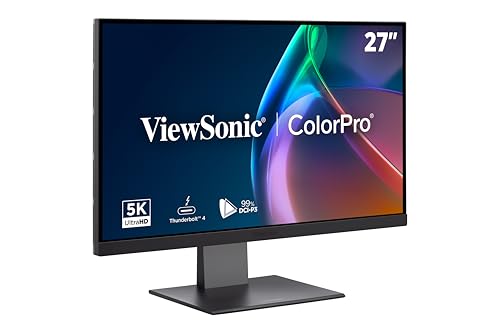
ViewSonic VP2788-5K 27 Inch 5K Monitor
$851.93 · sold by Amazon.com · Amazon shows a reference price of $929.99
The VP2788-5K offers the same 5K resolution with a Thunderbolt 4 upstream port rated at 100W, a second Thunderbolt 4 port for chaining another 5K display, and a stand with 120 mm of height travel, swivel and pivot, per ViewSonic. It currently sells for less than the BenQ, at $851.93 on November 14, 2026.
- 27 in 5K IPS, 218 ppi per ViewSonic
- 99% DCI-P3, Pantone Validated per listing
- Daisy-chains a second 5K display over Thunderbolt 4
- 120 mm height adjustment, swivel, tilt, pivot per ViewSonic
- You want the highest single-cable charging wattage in this list
- You plan to add a matching second 5K screen later
- You need more than two USB-A ports on the monitor
- Stock matters; Amazon shows it as low stock at times
Only 8 left in stock (more on the way).

Samsung 27" ViewFinity S8 (S80HF) 5K Monitor
$699.99 · sold by Amazon.com
Samsung's S80HF is the least expensive way into a 27 inch 5K panel on Amazon, at $699.99 on November 14, 2026. The listing describes USB-C with 90W charging, a LAN port and a built-in KVM switch, but not Thunderbolt, and Samsung's US page did not publish a VESA pattern we could confirm.
- 27 in 5K, 218 ppi per listing
- USB-C with 90W charging, built-in LAN port
- Built-in KVM switch, PIP and PBP per listing
- Model LS27H800EFAXZA
- You want 218 ppi sharpness and can live without Thunderbolt
- You dock a laptop with one USB-C cable and want Ethernet through the monitor
- You plan to use a monitor arm before confirming the mount
- You want to daisy-chain a second display
In stock on Amazon

BenQ PD2725U 27" 4K Thunderbolt 3 Monitor
$599.99 · sold by Amazon.com
The PD2725U is a 27 inch 4K panel, so it does not reach 218 ppi. It is here for readers who mainly read and write, sit a little further back, and would rather spend the difference on a chair or an arm. BenQ lists Thunderbolt 3 with 65W charging, a Thunderbolt 3 output, two HDMI ports and DisplayPort.
- 27 in 4K IPS, 95% P3, factory calibrated per listing
- Built-in KVM, Hotkey Puck G2
- Height, tilt, swivel and pivot adjustment
- You sit 25 inches or more from the screen, where 4K pixel structure is hard to see
- You charge a MacBook Air, which draws well under 65W
- You notice soft text in macOS scaled modes
- You have a 14 or 16 inch MacBook Pro; 65W will not keep up under load
Only 1 left in stock - order soon.
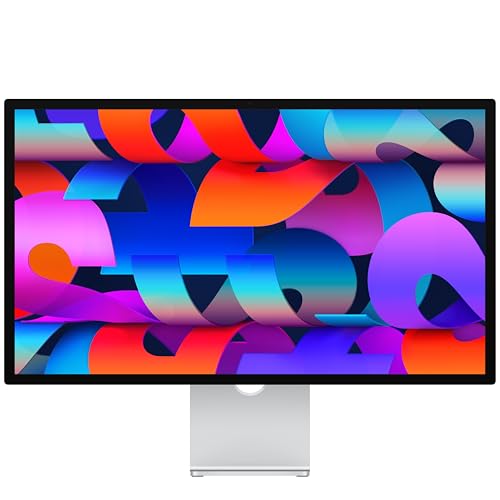
Apple Studio Display (Standard Glass, Tilt-Adjustable Stand)
$1,549 · sold by Amazon.com
Apple's current Studio Display pairs the 27 inch 5K panel with a 12MP Center Stage camera, three microphones, six speakers and Thunderbolt 5 with 96W host charging, per Apple. This listing is the tilt-only stand; the height-adjustable stand and the VESA mount adapter are separate configurations at higher prices.
- 27-inch 5K Retina, 218 ppi, 600 nits, P3 wide color per Apple
- 12MP Center Stage camera, three-mic array, six speakers
- Tilt-only stand in this configuration; height-adjustable stand and VESA adapter are separate configurations
- VESA 100 x 100 only on the VESA mount adapter version, chosen at purchase
- The camera, microphones and speakers would replace devices you would otherwise buy
- You want an all-aluminum enclosure that matches your Mac
- You need height adjustment and do not want to pay for the upgraded stand
- You plan to use an arm; only the VESA adapter version mounts, and you choose it at purchase
In stock on Amazon
The picks side by side
Fit rows come from the manufacturer or the listing; viewing distance is calculated from size and resolution.
| Specification | | | | | | |
|---|---|---|---|---|---|---|
| Diagonal | 27 in | 31.5 in | 27 in | 27 in | 27 in | 27 in |
| Resolution | 5120 × 2880 | 6016 × 3384 | 5120 × 2880 | 5120 × 2880 | 3840 × 2160 | 5120 × 2880 |
| View distance | 20–32 in (51–81 cm) | 24–38 in (61–97 cm) | 20–32 in (51–81 cm) | 20–32 in (51–81 cm) | 20–32 in (51–81 cm) | 20–32 in (51–81 cm) |
| VESA | 100 × 100 | 100 × 100 | 100 × 100 | Not published | 100 × 100 | Not published |
| Ports | Thunderbolt 4 (90W), Thunderbolt 4 out (15W), HDMI 2.1, DisplayPort 1.4, USB-C upstream, USB-C 10Gb/s, 3x USB-A 10Gb/s | 2x Thunderbolt 4 (96W, daisy chain), HDMI 2.1, DisplayPort 1.4, USB-C hub port, 2x USB-A | Thunderbolt 4 upstream (100W), Thunderbolt 4 downstream (15W), HDMI 2.1, DisplayPort, USB-C upstream, USB-C downstream (15W), 2x USB-A | USB-C (90W), LAN | Thunderbolt 3 (65W), Thunderbolt 3 out (15W), 2x HDMI 2.0, DisplayPort 1.4, USB-B upstream | Thunderbolt 5 upstream (96W host charging), Thunderbolt 5 downstream, 2x USB-C (10Gb/s) |
| Pixel density | 218 ppi | 218 ppi | 218 ppi | 218 ppi | 163 ppi | 218 ppi |
| Laptop charging | 90W (Thunderbolt 4) | 96W (Thunderbolt 4) | 100W (Thunderbolt 4) | 90W (USB-C) | 65W (Thunderbolt 3) | 96W (Thunderbolt 5) |
| Stand in the box | Height adjustable | Height, tilt, swivel, pivot | Height, tilt, swivel, pivot | Not detailed in listing | Height, tilt, swivel, pivot | Tilt only |
| Best for | Most Mac desks | Deep desks, big workspaces | Two-screen 5K setups | 5K on a budget | Readers who sit further back | Camera and audio built in |
| Price | $1,099.99 | $1,229 | $851.93 | $699.99 | $599.99 | $1,549 |
| Buy | View on Amazon | View on Amazon | View on Amazon | View on Amazon | View on Amazon | View on Amazon |
Charging figures are the monitor's maximum. A 16 inch MacBook Pro can draw more under sustained load.
How to choose
Start with your desk depth
A 27 inch screen wants your eyes about 20–32 inches away; a 32 inch screen about 24–38 inches. If your desk is shallow, the desk depth guide shows how an arm recovers space.
Decide on 27 or 32 inches
Both reach 218 ppi in this list. 32 inches at 6K gives more workspace at the same sharpness, but needs more distance and more desk width.
Count your wattage
MacBook Air models are comfortable on any monitor here. For a 16 inch MacBook Pro, expect slower charging under heavy work from 90–100W ports.
Think about glare
If a window faces your screen, a matte or anti-reflection panel such as the PD2730S, or the Studio Display's nano-texture option, does more for comfort than any spec on the box.
Plan for an arm early
If you will mount the screen, buy a VESA-compatible model now. The Studio Display only mounts in its VESA adapter configuration. See our monitor arm picks.
Who should skip these
If you use Windows rather than macOS, the 218 ppi argument is weaker: Windows scales text well on a 27 inch 4K panel, and a good 4K monitor costs far less. Our comparison of the Dell U2723QE and U3225QE covers that end of the market.
If you mostly take video calls and write, and you already own a good webcam and speakers, a 27 inch 4K screen at a comfortable distance is a reasonable place to stop. Spend the difference on a chair or a desk that fits you.
We also looked at the ASUS ProArt PA27JCV, a lower-cost 27 inch 5K model, but on Amazon it was only offered as a bundle whose listing mixed in accessory details we could not reconcile, so we left it out. LG's older UltraFine 5K is now only offered by third-party sellers.
Common questions
What is the best alternative to the Apple Studio Display?
For most Mac owners, the BenQ PD2730S: it has the same 27 inch 5K resolution (218 ppi), includes a height-adjustable stand, and offers Thunderbolt 4 with 90W charging. It was $1,099.99 on November 14, 2026, against $1,549 on November 14, 2026 for the base Studio Display.
Is a 4K monitor good enough for a Mac?
It works, but it is a compromise at 27 inches. macOS looks sharpest at about 218 ppi; a 27 inch 4K screen is 163 ppi, so you either accept large interface elements or use a scaled mode where fine text is slightly softer. Sitting further back makes the difference harder to see.
Can I mount an Apple Studio Display on a monitor arm?
Only the VESA mount adapter configuration accepts a 100 x 100 mm arm, according to Apple's specifications. The stand versions do not, and the configuration is chosen at purchase.
Will these monitors charge a MacBook Pro?
Yes, through a single Thunderbolt or USB-C cable, at 65W to 100W depending on the model. A 14 inch MacBook Pro is comfortable at that level. A 16 inch model can draw more under sustained load, so it will charge more slowly while you work.
Is 6K at 32 inches as sharp as 5K at 27 inches?
Yes. The ASUS ProArt PA32QCV is 218 ppi per ASUS, the same density as a 27 inch 5K panel, so text looks the same; you simply get a larger canvas. It needs a deeper desk, roughly 24–38 inches from your eyes.
Sources
Specifications are taken from each manufacturer or listing, not from our own testing. Where a number is marked “Not published”, we could not confirm it from the manufacturer. Recommended viewing distances are calculated, as explained in how we research.